SurveyMonkey is one of those tools where the pricing page tells you one number and your invoice tells you another.
So how much is SurveyMonkey?
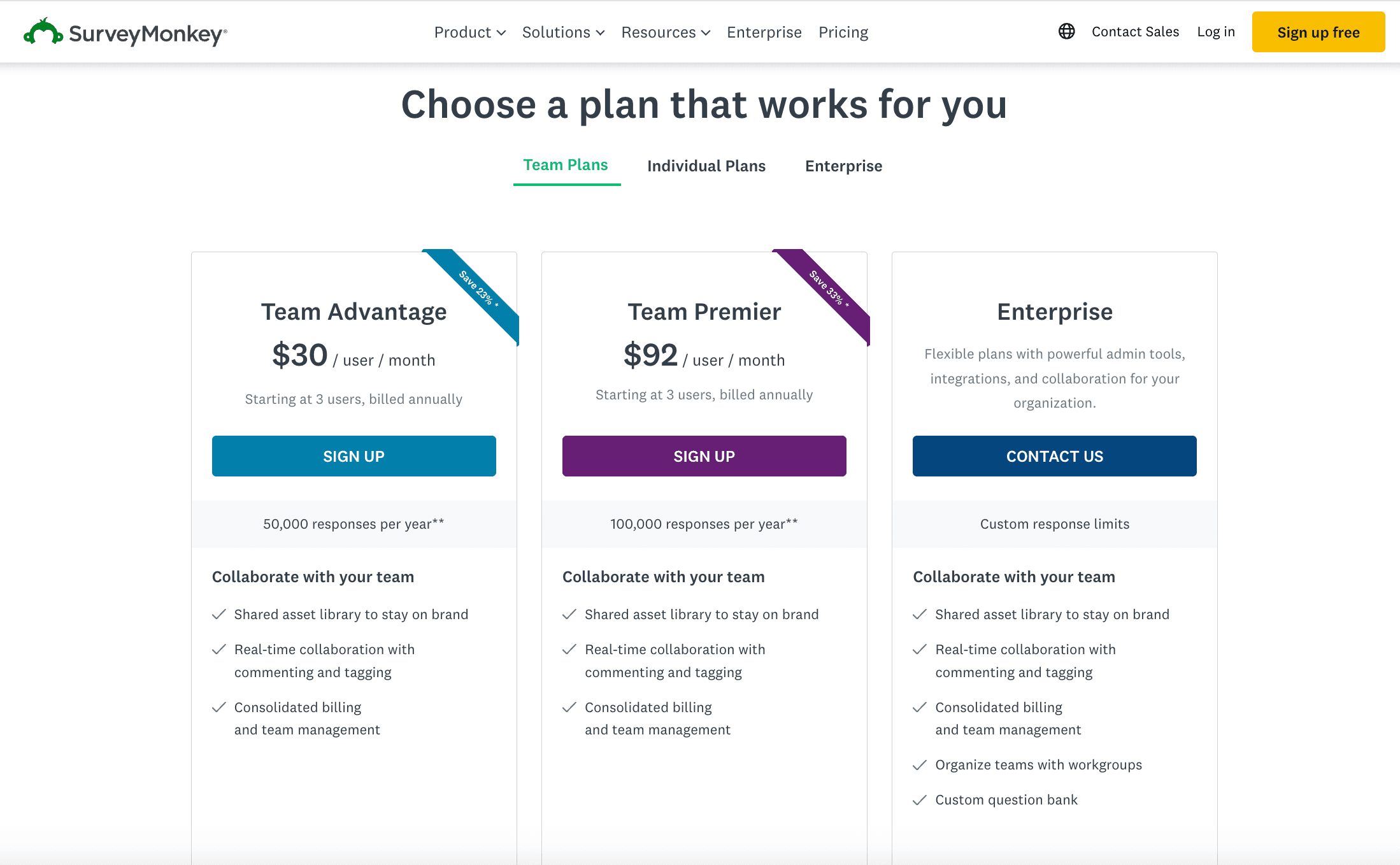
The short answer: anywhere from $0 to $92/user/month, depending on your plan. The SurveyMonkey free plan caps you at 10 questions and 40 responses per survey. The cheapest paid plan — the Standard monthly plan — runs $99/month with no annual discount. Commit to a yearly subscription and prices drop to $39/month on the Advantage plan. Team plans require a 3-user minimum and annual billing, so the real starting cost isn't $30/month — it's $1,080/year. And if you exceed your response limit? SurveyMonkey fees kick in at $0.15 per extra response, billed automatically.
You might be wondering if SurveyMonkey cost money for anything useful?
Essentially, yes. The free plan is a trial in disguise. None of the real costs are obvious from the SurveyMonkey plans and pricing page. So before you pick a plan, you need to understand what each tier actually includes, what's locked behind higher plans, and where the surprise charges live. That's what this guide covers.
We've also compared SurveyMonkey's prices to alternatives like SurveySparrow, Typeform, and Google Forms — so you can see whether you're getting the best value for what you need.
Detailed read on online survey tools and apps comparison→
SurveyMonkey pricing plans at a glance (2026)
Here's every SurveyMonkey plan with the real costs — not just the per-month headline number.
| Plan | Price | Billing | Responses included | Key features | Best for |
|---|---|---|---|---|---|
| Basic (Free) | $0 | — | 40 per survey | 10 questions/survey, basic templates, limited analytics | Testing the platform, simple one-off polls |
| Standard Monthly | $99/mo | Monthly | 1,000/month | Unlimited surveys & questions, AI builder, custom branding, basic analytics | Short-term projects, no annual commitment |
| Advantage Annual | $39/mo | Annually ($468/yr) | 15,000/year | All Standard features + data export, skip logic, question randomization | Individuals who survey regularly |
| Premier Annual | $139/mo | Annually ($1,668/yr) | 40,000/year | All Advantage features + advanced branching, A/B testing, sentiment analysis, phone support, remove SurveyMonkey branding | Power users who need advanced logic and white-labeling |
| Team Advantage | Starting ~$25–$30/user/mo | Annually (3-user min = $1,080/yr) | 50,000/year (shared) | Collaboration tools, shared libraries, centralized billing | Small teams needing shared access |
| Team Premier | Starting $75 - $92/user/mo | Annually (3-user min = $3,312/yr) | 100,000/year (shared) | All Team Advantage + sentiment analysis, advanced logic, multilingual surveys | Mid-size teams needing advanced analytics |
| Enterprise | Custom | Custom | Custom | SSO, HIPAA compliance, Salesforce/Tableau integration, dedicated support | Large organizations with compliance needs |
Prices as of March 2026. Verify on SurveyMonkey's pricing page before purchasing.
SurveyMonkey Basic plan — what you actually get for free
The SurveyMonkey free plan includes unlimited survey creation but limits you to 10 questions per survey and a SurveyMonkey Basic plan response limit of 40 responses per survey. No data export. No skip logic. No custom branding. SurveyMonkey branding appears on every survey. Responses beyond your plan's limit are deleted after 60 days if you don't upgrade.
If you're asking "is SurveyMonkey free?" — technically yes, but not in any way that's useful for professional work.
The costs that aren't on the pricing page
SurveyMonkey's sticker prices are reasonable. The problem is what happens after you pick a plan.
Overage charges — $0.15 per extra response
Every paid plan has a SurveyMonkey response limit — a fixed number of responses per year. Go over that limit and SurveyMonkey charges $0.15 per additional response, billed automatically to your card. No warning, no approval step — you just see the charge on your next invoice.
Here's what that looks like in practice:
- Team Advantage (50,000 responses included): Exceed by 10,000 → $1,500 extra
- Team Premier (100,000 responses included): Exceed by 20,000 → $3,000 extra
- A single viral survey that gets 5,000 unexpected responses → $750 surprise
And here's the what you need to know: deleted responses still count toward your limit. If you collect 500 test responses during setup and delete them, you've already used 500 of your annual allocation.
Annual billing locks you in
Only the Standard Monthly plan lets you pay month-to-month ($99). Every other paid plan requires annual billing. That means the Advantage plan isn't really "$39/month" — it's a $468 commitment on day one. For teams, the minimum is 3 users at $30/user = $1,080 upfront.
If you need survey software for a single project that lasts two months, you're either paying $198 for two months of Standard Monthly or $468 for a full year of Advantage. The cost of SurveyMonkey adds up fast when you factor in the billing structure. And since SurveyMonkey prices don't include monthly billing on team plans, you're locked in regardless of how your needs change mid-year.
Response caps that don't roll over
Unused responses from one billing period don't carry over to the next. If your Advantage plan includes 15,000 responses per year and you only use 8,000, those 7,000 unused responses disappear. You can't bank them for a busy quarter.
SurveyMonkey Audience costs extra
Want to reach respondents outside your own email list? SurveyMonkey Audience is a separate product with separate pricing. You pay per response, and costs vary depending on how niche your target audience is. This isn't included in any subscription plan — it's always an add-on.
While SurveyMonkey Audience is the default way to find respondents, researchers with more specific recruitment needs often turn to User Interviews. It provides a more targeted approach than general panels, offering access to over 7 million participants with a focus on high-quality matching—often delivering the first qualified participant within an hour. For teams that find SurveyMonkey's audience add-ons too expensive or lacking in professional granularity, this platform provides a dedicated solution to recruit and manage participants for any study type, ensuring you don't overpay for responses that don't match your criteria.
Branding removal requires Premier
On every plan except Premier Annual and Team Premier, your surveys carry SurveyMonkey's branding in the footer. If you want clean, white-labeled surveys for client-facing work or professional research, you need the $139/month or $92/user/month tier.
SPSS export requires higher tiers
If you need to export data in SPSS format for statistical analysis (common in academic and market research), that feature is locked behind Premier and Team Premier plans. Lower tiers only export to CSV, XLS, PPT, and PDF.
What SurveyMonkey actually costs in use-cases
The per-month prices on the pricing page don't show you what your invoice will look like. Here's what three common use cases actually cost per year.
Scenario 1 — Solo marketer running quarterly CSAT surveys
Plan: Advantage Annual
Annual cost: $468 ($39/month × 12)
Responses used: ~8,000 of 15,000 included
Overages:$0
Total: $468/year
This is the sweet spot for individual users. You stay under the response cap, you get skip logic and exports, and you're not paying for features you don't use.
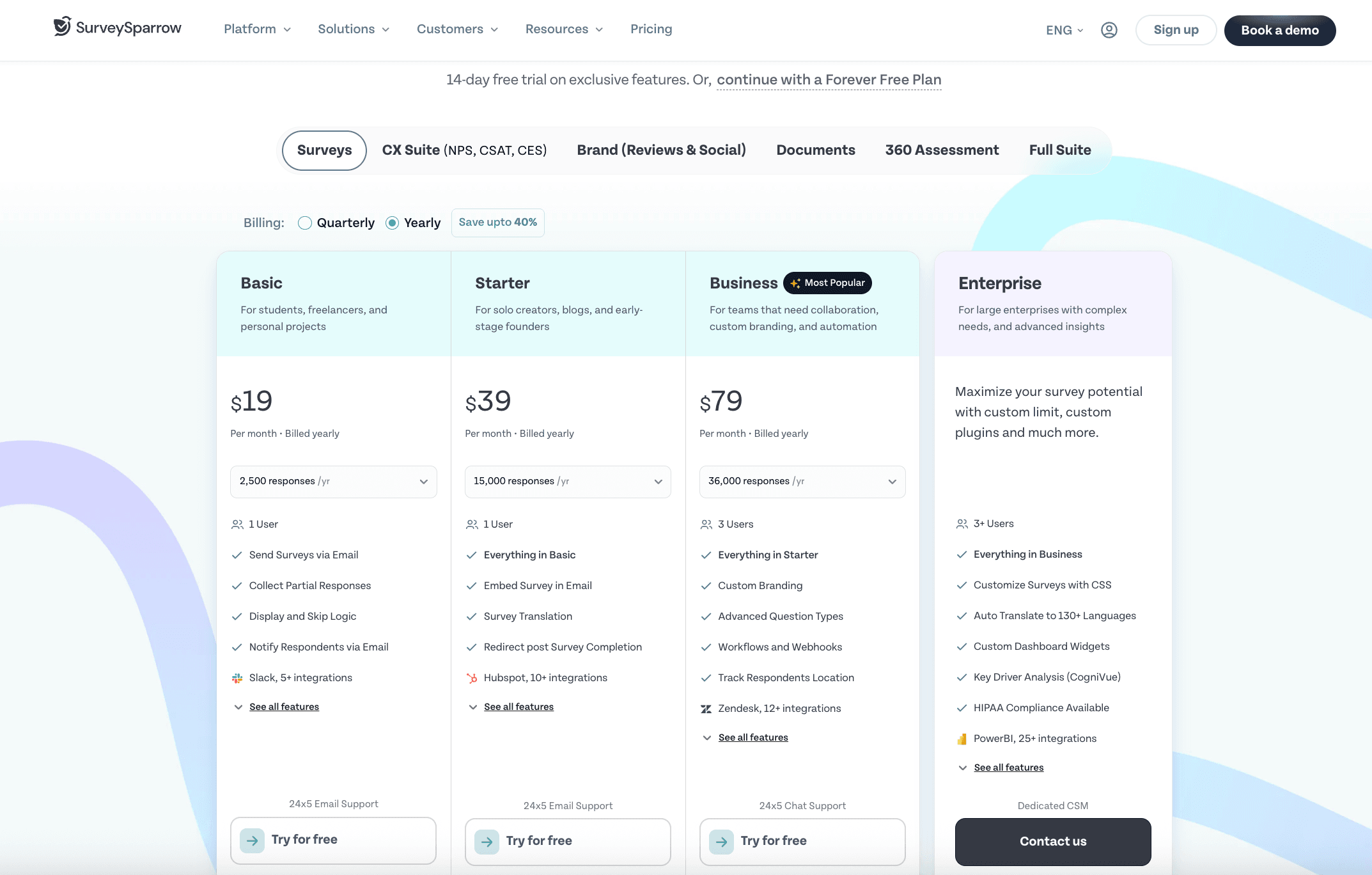
SurveySparrow equivalent: Basic plan at $19/month = $228/year — nearly half the cost, with conversational format included.
Scenario 2 — CX team of 5 running NPS + post-support surveys
Plan: Team Advantage (5 users)
Annual cost: $1,800 ($30/user × 5 × 12)
Responses used: 65,000 (15,000 over the 50,000 limit)
Overages: $2,250 (15,000 × $0.15)
Total: $4,050/year
This is where overages bite. A team that surveys after every support ticket can blow through 50,000 responses in 8 months. The overage charge adds 125% to the base cost.
SurveySparrow equivalent: Business plan at $79/month with 50,000 responses and 3 users = $948/year. For 5 users, the Professional plan at $249/month covers 100,000 responses with AI analysis = $2,988/year — and no overage surprises.
Scenario 3 — Research team of 5 needing white-label + advanced analytics
Plan: Team Premier (5 users)
Annual cost: $5,520 ($92/user × 5 × 12)
Responses used: 120,000 (20,000 over the 100,000 limit)
Overages: $3,000 (20,000 × $0.15)
Total: $8,520/year
At this budget, you're in enterprise territory. The question is whether SurveyMonkey's feature set at $8,520/year delivers more than a platform like SurveySparrow at $2,988/year with CogniVue AI, built-in ticketing, and 12 distribution channels — or Qualtrics, which offers deeper research capabilities at a higher price.
SurveyMonkey pricing vs. alternatives — side by side
SurveyMonkey isn't the only option, and for many use cases, it's not the most cost-effective one. Here's how it compares to three popular alternatives.
| Feature | SurveyMonkey (Advantage Annual) | SurveySparrow (Basic) | Typeform (Basic) | Google Forms |
|---|---|---|---|---|
| Starting price | $39/mo ($468/yr) | $19/mo | $25/mo | Free |
| Free plan | Yes (10 questions, 40 responses) | Yes (limited) | Yes (10 responses/mo) | Yes (unlimited) |
| Responses included | 15,000/year | 2,500/month | 100/month | Unlimited |
| Question types | 15+ | 15+ | 10+ | 11 |
| Conversational/chat format | No | Yes (40% higher response rates) | Yes | No |
| AI survey builder | Yes (Build with AI) | Yes (Wings AI) | Yes | No |
| Skip logic | Yes (Advantage+) | Yes (all paid plans) | Yes (paid only) | Yes (all) |
| White-label/remove branding | Premier only ($139/mo) | Business plan ($79/mo) | Plus plan ($55/mo) | N/A (no branding) |
| NPS/CSAT/CES built-in | Yes | Yes + AI-powered analysis (CogniVue) | Basic NPS only | No |
| Multi-channel distribution | Email, web link, embed | Email, SMS, WhatsApp, web, QR, offline (12 channels) | Email, web link, embed | Email, web link |
| Ticketing/closed-loop | No | Yes (built-in) | No | No |
| Overage charges | $0.15/extra response | Response limit by plan (no auto-billing overage) | Hard cap, no overages | None |
| Offline surveys | No | Yes | No | No (workaround with Google Forms app) |

Explore how SurveySparrow can transform your feedback process.
TRUSTED BY BEST-IN-CLASS BRANDS


SurveySparrow pricing — see plans and features →
SurveySparrow vs SurveyMonkey — detailed comparison →
Where SurveyMonkey wins
SurveyMonkey is hard to beat for brand recognition and ease of onboarding. Most people have used it at least once. The interface is familiar. The template library is massive. For simple, one-off surveys where you already have an email list, it gets the job done fast.
The analytics on higher-tier plans are solid — cross-tabulation, trend tracking, and the sentiment analysis on Team Premier are genuinely useful. If you're already embedded in SurveyMonkey's ecosystem and your team knows the tool, switching has a real cost in retraining and migration.
Where SurveyMonkey falls short
Response rate. SurveyMonkey surveys are traditional forms — a page of questions, a submit button, done. If response rates matter to you (and they should), SurveySparrow's conversational format consistently delivers 40% higher completion rates across the same audience. That's not a marginal difference.
Multi-channel reach. SurveyMonkey distributes via email and web links. SurveySparrow distributes across 12 channels — email, SMS, WhatsApp, web, QR codes, social, and offline. If your audience doesn't live in their inbox, SurveyMonkey leaves them unreached.
Closed-loop action. SurveyMonkey collects responses. SurveySparrow collects responses and turns detractor feedback into assignable tickets with built-in workflow automation. If "collecting feedback" and "acting on feedback" are two separate workflows in your stack, you're losing time in the gap between them.
Pricing transparency. Auto-billed overage charges of $0.15/response are a real pain point — especially for teams running multiple surveys simultaneously. SurveySparrow has response limits by plan, but doesn't auto-charge overages without your knowledge.
AI-powered analysis. SurveyMonkey offers sentiment analysis on Team Premier ($92/user/month). SurveySparrow's CogniVue provides AI-driven sentiment analysis, theme detection, and key driver identification — scanning every open-ended response automatically.
Which SurveyMonkey plan is actually worth it?
Skip the Standard Monthly. At $99/month with no annual discount, it's terrible value. You're paying $1,188/year for what the Advantage Annual plan gives you for $468/year. The only reason to pick Standard Monthly is if you need the tool for less than 5 months and want the flexibility to cancel.
For individual users: Advantage Annual ($39/month, billed annually) is the sweet spot. You get unlimited surveys, skip logic, data export, and 15,000 responses. If you need white-labeling or phone support, Premier Annual ($139/month) adds those — but the jump from $39 to $139 is steep.
For small teams (3–5 people): Team Advantage ($30/user/month) is the entry point. You get shared libraries, collaboration tools, and 50,000 shared responses. But do the math: 3 users = $1,080/year, 5 users = $1,800/year — and that's before overages.
For larger teams: Team Premier ($92/user/month) adds sentiment analysis, multilingual surveys, and advanced logic. Five users costs $5,520/year. At that price, you should compare against SurveySparrow's Business plan ($79/month for 3 users with 50,000 responses, CogniVue AI, and built-in ticketing) or Professional plan ($249/month for 5 users with 100,000 responses and HIPAA compliance).
For enterprises: SurveyMonkey Enterprise pricing is custom. If you're at this level, you're likely comparing against Qualtrics, Medallia, or SurveySparrow's Enterprise offering. Get quotes from all of them — the pricing spread at enterprise tier is significant.
When SurveyMonkey makes sense (and when it doesn't)
SurveyMonkey is a good choice if:
- You need a familiar, well-known tool that your team can start using immediately
- Your surveys are primarily email-based and you don't need WhatsApp, SMS, or offline distribution
- You're an individual running occasional surveys and the Advantage Annual plan covers your needs
- You need SurveyMonkey Audience to reach respondents outside your existing contacts
Consider an alternative if:
- Response rates are a problem and you need conversational survey formats
- You need multi-channel distribution (SMS, WhatsApp, offline, QR)
- You want AI-powered analysis of open-ended feedback without paying for the highest tier
- You need closed-loop feedback (survey → ticket → assign → resolve) in one platform
- You're a team of 3+ and the annual billing commitment feels risky
- You want NPS, CSAT, and CES with built-in analytics, not just question types
- You need white-labeling without paying $139/month
Looking for a SurveyMonkey alternative that gives you more channels, AI analysis, and built-in ticketing — starting at $19/month?
Explore how SurveySparrow can transform your feedback process.
TRUSTED BY BEST-IN-CLASS BRANDS