Customer Experience
Customer Journey Map: What It Is, How to Build One That Lasts
Find out how to create a powerful customer journey map that reveals critical insights, optimizes interactions, and transforms customer experiences across every touchpoint.

TRUSTED BY BEST-IN-CLASS BRANDS


Watch Customer Stories

A customer journey map is a visual document that shows every interaction a customer has with your brand — from first awareness to post-purchase. It maps what customers do, what they feel, and where they get stuck. Teams use it to find friction, fix gaps, and design experiences worth repeating.
Most teams build a customer journey map once, present it in a workshop, and never open the file again.
The map lives in Miro. The problems live in the product, the support queue, and the NPS scores.
This blog will cover what a customer journey map actually is, how to build one that reflects reality, and most importantly, how to keep it from becoming wallpaper. We also include what CX practitioners say about the process, because the recycled 'five stages, seven steps' version doesn't tell you what actually happens in the trenches.
What is a customer journey map?
A customer journey map is a visual representation of the complete experience a customer has with your brand. It captures every touchpoint from the moment they first hear about you to long after they've made a purchase — and shows what they're doing, thinking, and feeling at each stage.
The map isn't a marketing document. It's an operational tool. When it's working, it tells your product, support, sales, and CX teams exactly where customers are getting stuck and who owns fixing it.
Research from XM Institute indicates that customer journey mapping can meaningfully improve customer satisfaction, with one Qualtrics/XM Institute page citing a potential 20% lift in satisfaction when journeys are optimized
Why most customer journey maps end up as wallpaper
Journey maps fail for a predictable set of reasons. Not because the concept is flawed — because the process around them is.
- They get built internally, without talking to customers. A workshop of employees guessing at customer feelings is not a journey map. It's a hypothesis with a nice colour scheme.
- Nobody owns the map after launch. It gets presented once, praised, and filed away.
- The map doesn't connect to operational decisions. When a new friction point appears — a changed process, a new channel, a shift in customer behaviour — the map doesn't update.
- Teams optimise for polish over accuracy. The more beautiful the Miro board, the less likely it is to reflect what's actually happening.
The fix isn't a better template. It's a different relationship with the document.
Read More: 5 Stages of the E-Commerce Customer Journey
What practitioners say (and what they wish they'd known)
We asked the Reddit users in r/customerexperience community what actually happens when teams build customer journey maps. Asking— 'Where do customer journey maps go to die?' — which pulled in perspectives from practitioners across CX, operations, and consulting. Here's what they said.
u/LuvBBQandCX "If you're creating them in an internal workshop, your odds of success are about zero... When we measure the results against what customers said, [employees] missed most of what the customers cared most about." |
u/Kaumudi_Tiwari "The hardest part usually isn't building the map, it's keeping it connected to reality. Most journey maps die because they become a one-time workshop artifact instead of something tied to real customer feedback, support tickets, and behavior data." |
u/PrettyAmoeba4802 "Most journey maps die the moment they stop being tied to operational decisions... The most useful maps I've seen were much less polished and much more operational. Basically: where are customers getting stuck right now, and who owns fixing it?" |
The pattern is consistent: maps that work are operationally anchored, cross-functional, and built with direct customer input. Maps that don't are internal exercises dressed up as customer research.
Source: r/customerexperience — 'Where do customer journey maps go to die?'
Key components of a Customer Journey Map
Every effective journey map includes the same core elements. How you design them matters less than making sure each one reflects real customer data.
1. Persona
A specific customer type — defined by behaviour, goals, and context — not just demographics. Each persona gets its own map. A SaaS company's enterprise buyer and its self-serve user have completely different journeys.
“Focusing on the customer makes a company more resilient.”
– Jeff Bezos
2. Touchpoint
Every point of contact between the customer and your brand: website visits, emails, support tickets, social mentions, sales calls, and in-product interactions. The goal is to map them all, not just the ones your team designed.
3. Moment of Truth
The touchpoints where customer perception shifts significantly — for better or worse. A product onboarding experience, a first support interaction, a renewal conversation. These are the points worth optimising first.
4. Emotions and pain points
What the customer is feeling at each stage. This data comes from interviews, support transcripts, NPS verbatims, and review platforms — not internal assumptions.
4. Ownership and metrics:
Each section of the map should have a team or individual responsible for it, and a metric attached to it. Without these, the map is descriptive rather than actionable.
Read more: 37 Stats that Prove the Importance of Customer Satisfaction, Retention, & Loyalty
Customer journey map examples (real-world)
Here are ten real-world customer journey map examples across different industries and use cases.
- SaaS onboarding map: Tracks the path from free trial sign-up to first value moment. Key friction points typically include day-1 activation rate, feature adoption, and the first support ticket.
- E-commerce purchase map: Covers awareness through post-delivery. Maps abandoned cart moments, email re-engagement, delivery experience, and return rate drivers.
- B2B sales cycle map: Documents the multi-stakeholder decision journey. Includes the champion, the economic buyer, and the technical evaluator — each with different touchpoints and concerns.
- Healthcare patient map: Traces the patient experience from symptom awareness to follow-up care. Critical moments of truth include first appointment scheduling and diagnosis communication.
- Hospitality guest map: Covers pre-stay research through post-stay review. Airbnb famously uses this model — host and guest journeys mapped separately and connected at booking.
- Retail banking map: Documents the customer's path from account opening to first loan product. Common pain points include KYC friction and branch-to-digital transition.
- HR / Employee journey map: Maps the employee experience from recruitment through offboarding. Used by People teams to reduce early attrition and improve engagement scores.
- EdTech student map: Tracks learner progression from course discovery to certification. Dropout points are the key optimisation targets.
- Telecom subscriber map: Documents the full lifecycle from contract signing to churn. Customer service interactions are typically the highest-friction moments.
- CX platform evaluation map: Tracks how a CX or VoC buyer moves from problem awareness to vendor selection. This is SurveySparrow's own territory — and the map for this persona directly informs how we build our own onboarding.
How to create a customer journey map: step by step
Follow these steps to build a journey map that reflects reality — not a workshop guess.
Step 1: Define the scope and the business problem
Pick one persona and one scenario. 'Our entire customer journey' is not a scope — it's a project that will take six months and produce a document nobody uses. Start with a specific question: 'Why do trial users drop off before day 7?' or 'What causes our enterprise customers to request early cancellation?'
Step 2: Interview real customers — before you build anything
Run 8–12 interviews with customers who fit your target persona. Ask about their goals, their frustrations, and the moments where your brand either helped or let them down. Don't describe a map to them — ask open questions and listen. The map comes after; the data comes first.
Teams that include customer interviews in their mapping process are significantly more likely to see measurable CX improvements. Internal-only workshops consistently underestimate the friction points customers actually experience.
Step 3: Gather quantitative data alongside qualitative
Pull NPS scores, CSAT ratings, support ticket themes, product analytics (drop-off points, session recordings), and review data. You're looking for where customer feelings (qualitative) line up with measurable behaviour (quantitative). The overlap is where your biggest opportunities live.
SurveySparrow's CogniVue — your intelligent data analyst — scans open-ended feedback across every channel and clusters it by theme automatically. No manual tagging. No spreadsheet sorting.
Step 4: Build a cross-functional team, not a solo project
Bring in product, support, sales, and marketing. Each team sees a different slice of the customer journey. A CX team alone will miss what support tickets reveal. A product team alone will miss what sales conversations reveal. The map is only as complete as the perspectives in the room.
Step 5: Visualise and validate
Build the first version, then take it back to customers. Show them the map. Ask: 'Does this reflect your experience?' The answer will almost always reveal gaps. Adjust, then share internally.
Step 6: Assign ownership and connect to metrics
Every stage of the map needs an owner and a metric. If no one is responsible for a touchpoint, it won't improve. If there's no metric attached, you can't measure whether it has.
How to keep your map alive (the part nobody tells you)
A journey map is a living document or it's a dead one. There is no in-between.
The teams that actually use their maps revisit them quarterly. They treat the map the way an engineering team treats a system architecture diagram — something to update when the system changes, not something to frame on the wall.
- Connect the map to your feedback loop. Every NPS score, support ticket, and product analytics report should be able to update at least one section of the map.
- Assign a map owner. One person is responsible for calling the quarterly review, collecting updates from each team, and flagging when a touchpoint has materially changed.
- Keep the format operational, not decorative. The most-used maps are the least polished. A Google Doc with a clear owner beats a beautiful Miro board with none.
- Use AI to stay current. SurveySparrow's CogniVue automatically surfaces emerging themes in customer feedback — so you don't need a quarterly project to spot a new friction point. It tells you before it becomes a trend.
How SurveySparrow helps you build and maintain your journey map
SurveySparrow is a unified Voice of Customer (VoC) platform — which means the data that feeds your journey map and the system that keeps it alive are in the same place.
Journeys — your end-to-end CX map, built in.
Most teams build their journey map in one tool and collect feedback in another. Those two things never talk to each other, which is why the map goes stale.
Journeys is SurveySparrow's native CX mapping feature. It maps your customer lifecycle into milestones and touchpoints — Awareness, Consideration, Purchase, Onboarding, Support — and links a survey to each one. Every response flows back into the map automatically, so you can see exactly how customer sentiment shifts from one stage to the next.
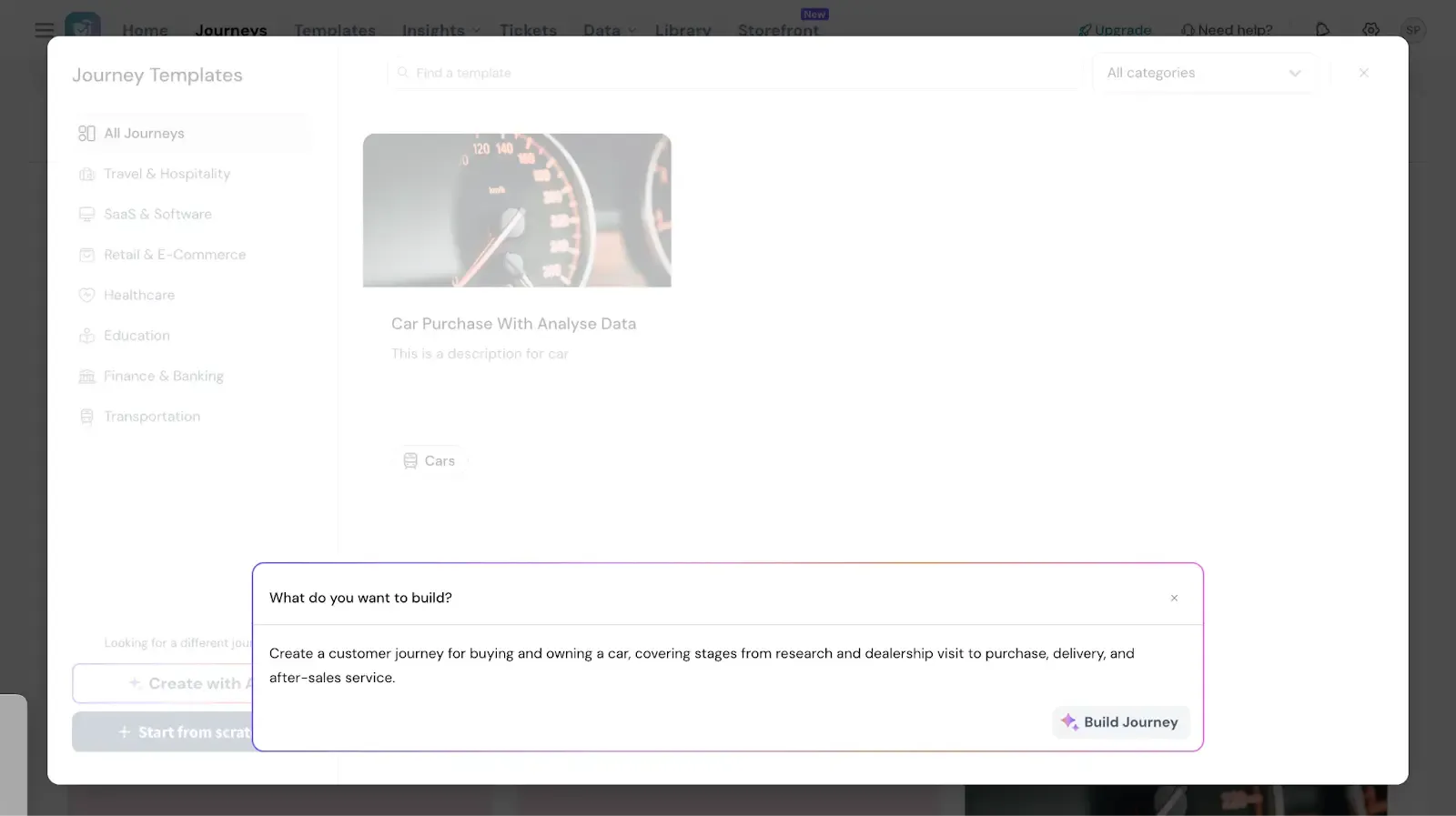
- Build your journey from an industry template, from scratch, or let AI generate the milestones and touchpoints based on your use case.
- Link your existing SurveySparrow surveys to each touchpoint — CSAT, NPS, CES — so feedback is contextual, not isolated.
- Track sentiment trends across the entire lifecycle in one visual view. Spot exactly where the experience breaks down.
- Share the journey view with your team — a living document, not a static Miro board.
This is what the practitioners in the Reddit thread were describing as the missing piece: a map that stays connected to real customer data. Journeys is that connection.
Conclusion
Your journey map is only as useful as the feedback system behind it. Take the time to understand why a customer behaves in a certain way and take steps to make that transaction as meaningful as possible. Once the map is ready, go through each process multiple times before declaring it final. Also, add one or two stakeholders with a different point of view to ratify the document.
And, get set on your first customer journey map with SurveySparrow. It’s free to try. Why don’t you take it for a spin?

Get started with your meaningful customer journey map
TRUSTED BY BEST-IN-CLASS BRANDS
Watch Customer Stories