How to Prevent Survey Fatigue With Survey Throttling
Nov 25, 2026
Table of Contents
A use case on capping how often each respondent receives surveys from your SurveySparrow account.
Survey fatigue happens when the same people get too many surveys and stop answering. It usually starts when several teams run surveys at once.
For example, when a customer buys a product, contacts support, and logs in to your app in the same week, would get three different survey requests from three teams. As a result, response rates could drop, and the people who still answer may no longer represent your customer base.
Survey throttling fixes this by setting a limit on how many surveys one person can receive in a set number of days. In SurveySparrow, you can set that limit for your whole account, for a single survey, or both. Survey throttling is available on the Enterprise plan.
How survey throttling works in SurveySparrow
Survey throttling is a rule that limits how many surveys a contact can receive within a time window you choose.
You set two numbers: how many surveys, and over how many days.
For example, a rule of 3 surveys in 30 days means no contact receives more than three surveys from your account in any 30-day period.
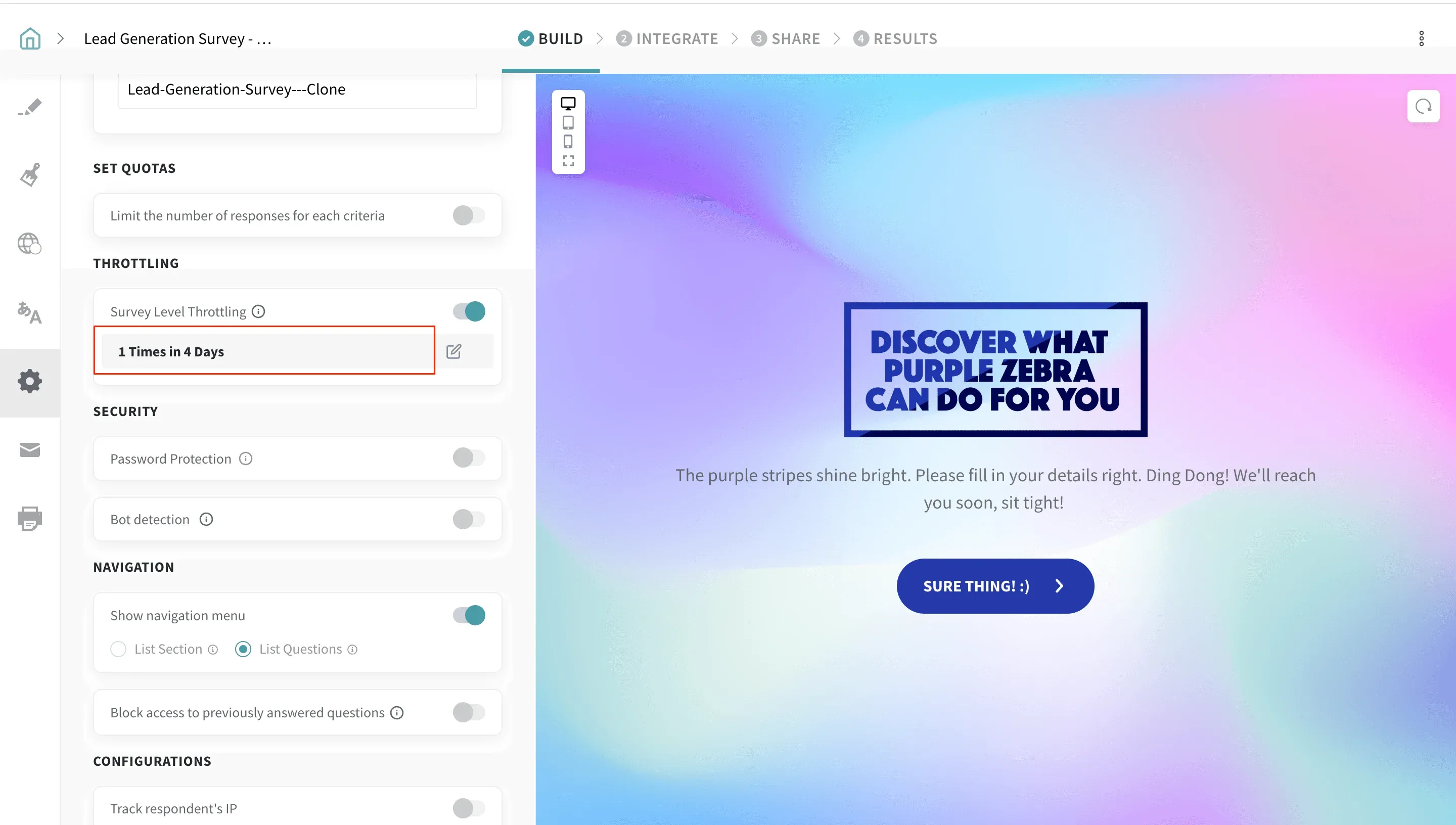
SurveySparrow has two levels of throttling:
- Account-level (global) throttling applies one limit to every survey in your account. Use it as the default rule that protects all your contacts.
- Survey-level throttling sets a separate limit for one survey. Use it when a survey needs its own timing, such as a quarterly NPS survey.
There are three rules that decide how the two levels work together:
- A survey-level rule replaces the account rule for that survey. Once you turn on survey-level throttling, that survey follows only its own limit, not the account-wide one.
- Reminder emails still go out. Throttling doesn't count or block reminders, so factor them in when you plan how often people hear from you.
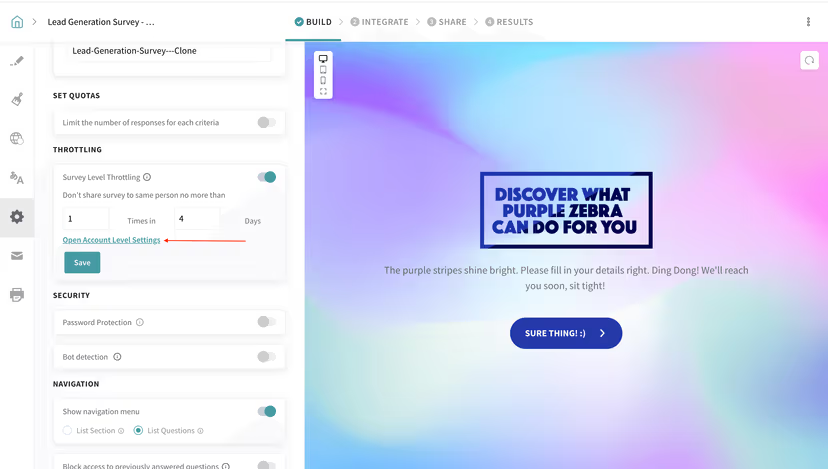
- You can see both rules in one place. When you set a survey-level rule, there's a link to open the account settings, so you can compare the two before you save.
How to set up survey throttling
Set up the account-level rule first. It covers every survey at once, so no contact gets too many surveys even if a team forgets to set its own limit. Then add a survey-level rule only for surveys that need different timing.
Set an account-level rule
- On your survey dashboard, click the Settings icon.
- Go to Email Settings, then Survey Throttling.
- Turn on the toggle to enable global throttling.
- Enter the number of surveys and the number of days, for example 3 surveys in 30 days.
- Click Save.
Optional: Set a rule for a single survey
You don't need this step for most surveys, because the account-level rule already covers them. Use a survey-level rule in two cases:
- One survey needs different timing. For example, a quarterly NPS survey that should go out once every 90 days.
- You only want to limit one survey. If you haven't set an account-level rule, you can skip it and throttle just this survey.
Keep in mind that a survey-level rule replaces the account rule for that survey.
- Open the survey and go to the Build tab.
- Open the config section.
- Under Throttling, turn on Survey Level Throttling.
- Enter the number of surveys and the number of days for this survey.
- Click Save.
How to choose your throttling limits
Your throttling limit is the most surveys one person should get from you in a set period. There's no universal number, so work it out in four steps.
Step 1: List every survey a customer can get
Write down each survey, the team that owns it, and what triggers it. An ecommerce company's list might look like this:
- Order CSAT: owned by operations, sent after each delivery
- Support CSAT: owned by support, sent when a ticket closes
- Relationship NPS: owned by the CX team, sent every three months
Then look for overlaps. A customer who places an order and contacts support in the same week gets two surveys, or three if NPS is due.
Step 2: Set one limit for the whole account
Using your list, decide the most surveys any one person should get in a month across all teams. In the example above, up to three surveys can land in the same month, so a limit of 2 in 30 days is a reasonable place to start. Treat it as a test, and adjust it later.
Step 3: Give your NPS survey its own rule
First, a quick note on the two kinds of NPS. Transactional NPS goes out right after an event, such as an order or a support ticket, and measures that one moment. Relationship NPS goes to all your customers on a fixed schedule, usually every quarter, and asks how they feel about your company overall. Its value comes from comparing one quarter with the next, so it has to go out on time, every time.
Here's the problem. In our example, the account rule is 2 surveys in 30 days. Say a customer gets an order CSAT and a support CSAT this month. They've hit the limit. If your quarterly NPS is due that same month, the account rule blocks it. That customer drops out of the quarter's NPS, and your trend gets gaps.
The fix is to give your NPS survey its own survey-level rule, such as 1 survey in 90 days. A survey-level rule replaces the account rule for that survey. So NPS follows only its own 90-day limit, and the 2-in-30 account limit can't block it.
Step 4: Review after one month
After throttling has run for a month, check whether your limit is working. Look at two things:
- Are response rates still falling? Then customers are still getting too many surveys. Lower the account limit, for example from 2 surveys in 30 days to 1.
- Are important surveys being held back? In our example, if order CSAT surveys after a failed delivery aren't reaching customers, the limit is too strict. Raise the account limit to 3 in 30 days, or give that survey its own survey-level rule, as you did for NPS.
If neither is happening, keep the limit as it is and check again next month.
What causes survey fatigue
Survey fatigue has more than one cause. A 2024 letter in the Journal of Caring Sciences groups the main causes into four types:
- Over-surveying: people get survey requests too often. The customer in our example gets three requests in one week, one from each team. This is the most common type, and the one survey throttling is built to control.
- Question fatigue: the same question is asked in slightly different ways, within one survey or across several. If the purchase survey and the support survey both ask how satisfied the customer is, the second request feels like a repeat.
- Long surveys: every extra question adds effort. Respondents get tired partway through, rush their answers, or prematurely end their survey.
- Surveys that seem pointless: people stop answering when they believe nothing will change because of their feedback. If the customer filled in last quarter’s survey and saw no follow-up, they have little reason to answer the next one.
Other causes are poorly designed questionnaires, too many open-ended questions, and surveys sent to people whose experience doesn’t match the questions.
Fatigue doesn’t always show up as fewer responses. Tired respondents often still submit the survey but skip questions, leave text boxes empty, accept default answers, or pick the same option down a whole list. Those responses look complete, but they make your results less accurate.
Tips to reduce survey fatigue
Throttling decides how often people hear from you. But even one survey a month can feel like too much if it's long, badly timed, or people never see their feedback lead to any change. These tips help with those other causes of survey fatigue.
- Keep surveys short. Ask only the questions you will act on, and cut any that are “nice to know.” As a result, more people finish the survey, and they give more thought to each answer because they aren’t worn out by question 12.
- Send the survey right after the experience. Trigger the support survey when the ticket closes, not a week later. The experience is fresh in the customer’s mind, so their answers are more accurate and specific.
- Ask each question only once. Check that your purchase, support, and NPS surveys don’t ask the same thing in different words. This is question fatigue and respondents won't feel like repeating themselves.
- Limit open-ended questions. Use one or two text questions where you need detail, and multiple-choice or rating questions everywhere else. Therefore, the survey takes less effort to complete, and the text answers you do get are more thoughtful.
- Send surveys only to the right people. Send the support survey only to customers who contacted support, and the product survey only to people who use that feature. Every question matches the respondent’s experience, so your results reflect what customers actually went through. Explore SmartReach.
- State the purpose and how long it will take. Communicating the aim of the survey will encourage people to participate in your survey. Also add one line to the invitation, for example: “Two minutes to help us improve onboarding.” This sets the right expectations for participants before they start, which makes them more willing to begin and less likely to drop off.
- Show people what changed because of their feedback. Share a short update, such as “You told us checkout was slow, so we cut it to one page.” Customers see that answering makes a difference, so they are more likely to respond the next time you ask.
- Thank respondents. End with a thank-you message, and consider a small incentive for longer surveys. A simple acknowledgment builds goodwill and makes future survey requests feel less like a chore.
Stop over-surveying your customers—automatically
TRUSTED BY BEST-IN-CLASS BRANDS


















Start reducing survey fatigue today
Survey fatigue builds up when the same people hear from you too often, or when each survey asks more of them than it gives back. Survey throttling handles the first problem. One account-level limit, plus a separate rule for surveys like NPS, keeps the customer in our example from getting three requests in one week.
The tips above handle the rest. Short, well-timed surveys sent to the right people, with a clear reason to answer and visible follow-up, keep respondents willing to share honest feedback. Together, they protect both your response rates and the quality of the answers you collect.
SurveySparrow brings these controls together in one platform. Alongside survey throttling, SurveySparrow provides feature such as conversational surveys, distribution across 15 channels, recurring surveys, automatic support tickets for low scores, CogniVue text analytics for themes and sentiment, white-label surveys, and data hosting in seven regions.
