
Designing and conducting a survey is indeed easier said than done. However, with the right tools at hand, this could even turn into a fun process!
Survey design is the process of planning a survey so it collects accurate, useful answers to a specific question. It covers what you want to learn, who you ask, how you word each question, how you send the survey, and how you plan to analyze the results.
This guide covers the objectives of survey design, the main types of survey designs, a step-by-step process for creating a research survey, how to design a customer survey, and practical ways to encourage people to respond.
What Is Survey Design?
Survey design is the process of putting together efficient surveys that will help you collect much-needed research. And more often than not, it uses an online survey tool or some ready-made templates.
Survey design is the plan behind a survey. It defines what information you need, who should provide it, and how you’ll collect and analyze it.
A survey design has five main components:
- Research objectives: The specific questions the survey needs to answer.
- Target population and sampling: The group you want to learn about and the subset of people you’ll invite.
- Questionnaire: The questions, answer options, and order in which they appear.
- Distribution method: How respondents receive the survey, such as email, SMS, a website pop-up, or in person.
- Data analysis plan: How you’ll review and interpret the responses.
Each component depends on the others. For example, your objective determines which questions you need, and your target population determines which distribution channel will reach them.
What are the objectives of survey design?
Good survey design aims to collect data that answers your research question accurately and can be used to make decisions. It does this through five objectives.
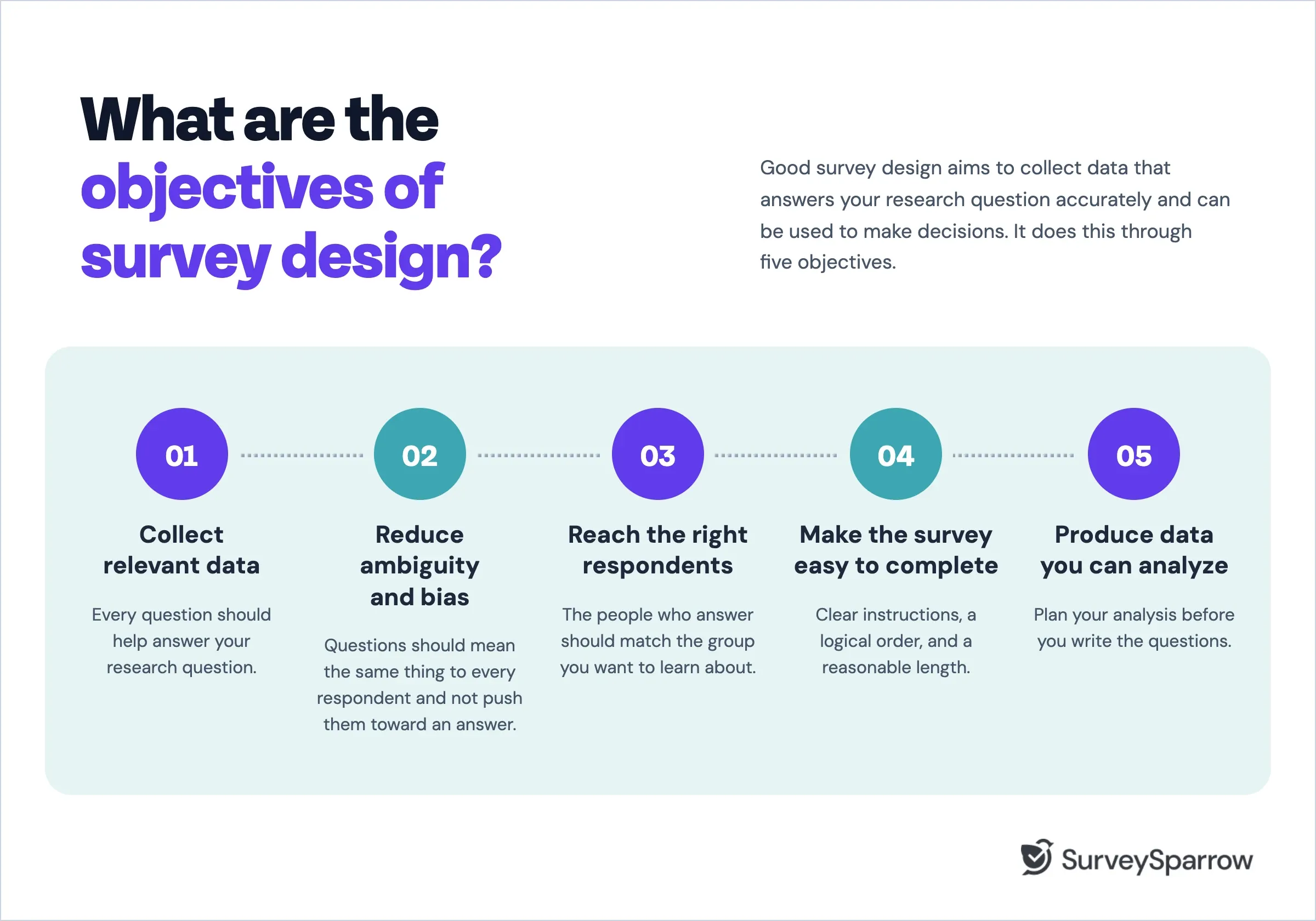
1. Collect relevant data. Every question should help answer your research question. Questions that don’t serve the objective lengthen the survey and add data you won’t use.
2. Reduce ambiguity and bias. Questions should mean the same thing to every respondent and should not push them toward a particular answer. Avoid asking about 2 things in 1 question.
3. Reach the right respondents. The people who answer should match the group you want to learn about. If they don’t, the results won’t reflect that group’s views, no matter how many responses you collect.
4. Make the survey easy to complete. Clear instructions, a logical order, and a reasonable length reduce the chance that people quit partway or rush through their answers.
5. Produce data you can analyze. Plan your analysis before you write the questions. If you want to compare satisfaction between new and returning customers, for example, you need a question that identifies which group each respondent belongs to.
A clear objective makes the rest of the design easier. Suppose a software company wants to know why new users stop using the product within their first month. That objective points to questions about the onboarding experience, setup difficulties, and missing features. It also rules out questions about pricing preferences or brand awareness, which belong in a different survey.
What are the types of survey designs?
Survey designs are usually grouped by their purpose and by when data is collected. The categories describe different aspects of a study, so one survey can fit more than one type.
Exploratory survey design
An exploratory survey investigates a topic you don’t yet understand well. Researchers use it to identify issues, generate ideas, or shape the questions for a larger study.
Exploratory surveys often rely on open-ended questions, because you don’t know enough to write fixed answer options yet. For example, a nonprofit planning a new program might ask community members to describe the challenges they face, then use the answers to design a structured survey later.
Descriptive survey design
A descriptive survey measures the characteristics, opinions, or behaviors of a population. It answers questions about what is happening, how often, and among whom.
Most business and public opinion surveys are descriptive. An employee engagement survey that measures how satisfied staff are with their workload is one example.
Read more: Descriptive research 101
Correlational survey design
A correlational survey examines whether two or more variables are related. For example, a researcher might measure whether employees who work remotely more often report higher job satisfaction.
A correlation shows that two things tend to occur together. It doesn’t show that one causes the other. Remote workers might report higher satisfaction for other reasons, such as having more senior roles.
Cross-sectional and longitudinal survey designs
These designs describe when you collect data.
- Cross-sectional surveys collect data at a single point in time. They give you a snapshot, such as how customers rate your service this quarter.
- Longitudinal surveys collect data at several points in time to track change. A panel study that surveys the same students every year from enrollment to graduation is longitudinal.
If you repeat a survey to measure change, keep the questions consistent.
Surveys can also form part of experimental studies, where researchers assign people to different conditions and compare their answers. A survey on its own, however, can’t establish that one factor causes another.
How to design a research survey?
The steps below take you from a research question to analyzed results. Follow them in order, because each step depends on decisions made in the one before.
1. Define your research question
Start by writing down what you want to learn and what decision the results will support. A specific research question keeps the rest of the survey focused.
Compare these two:
- Vague: “What do students think about online learning?”
- Specific: “Which features of online courses do first-year undergraduates find most and least helpful for keeping up with coursework?”
The specific version tells you who to survey and what to ask. Once you have it, list the information you need to answer it. Each item on that list will become one or more questions.
2. Identify your target population
Your target population is the full group you want to learn about. Define it as precisely as you can, using inclusion and exclusion criteria.
- Inclusion criteria describe who qualifies, such as “first-year undergraduates enrolled in at least one online course.”
- Exclusion criteria describe who doesn’t, such as “students who withdrew before the midterm.”
Clear criteria prevent you from collecting answers from people outside the group, which would distort your results. If you can’t verify eligibility in advance, add one or two screening questions at the start of the survey.
3. Choose a sampling method and calculate sample size
A sample is the subset of your target population that you invite to take the survey. How you choose that sample determines how far you can generalize the results.
Probability sampling gives every member of the population a known chance of being selected, usually through random selection. It allows you to make statistical estimates about the whole population. Common methods include simple random sampling and stratified sampling, where you divide the population into groups, such as year of study, and sample randomly within each one.
Non-probability sampling selects people based on convenience or judgment, such as surveying everyone who visits a website or asking participants to refer others. It’s faster and cheaper, which makes it useful for exploratory research and early feedback. The results, however, may not represent the full population.
Next, decide how many completed responses you need. The right number depends on your population size, how precise you need the results to be (the margin of error), and how confident you want to be in them (the confidence level). SurveySparrow’s sample size calculator estimates the number for you based on these inputs.
Plan to invite more people than your target, since you can't expect everyone to respond. If your sample size is 300 and you feel that 20% of them won't take the survey, then invite 75 more people to take it.
To calculate how many more people to invite, you need to determine the total number of invitations (N) required to yield 300 completed surveys, given an expected non-response rate of 20%. Step-by-Step Calculation
|
4. Write clear, unbiased questions
Each question should be easy to understand and should let respondents answer honestly. Even small wording changes can be interpreted differently, shifting results.
Watch for these four common problems.
Leading questions suggest a preferred answer. The wording signals what the researcher expects to hear, which nudges respondents toward agreeing.
- Leading: “How helpful was our excellent support team?”
- Neutral: “How would you rate your experience with our support team?”
The first version assumes the team is excellent. The second lets respondents form their own judgment.
Double-barreled questions ask about two things at once, so a single answer can’t tell you which part the respondent meant.
- Double-barreled: “How satisfied are you with the course content and the instructor?”
- Revised: Split it into two questions, one about the content and one about the instructor.
Ambiguous questions use words that people interpret differently. “Do you exercise regularly?” means daily to one person and monthly to another. Ask “How many days did you exercise in the past week?” to get a precise answer.
Technical or unfamiliar terms confuse respondents who don’t share your vocabulary. Use plain language, or define a term the first time it appears.
5. Choose the right question types
The question type determines what kind of data you collect. Match each format to the information you need.
- Multiple choice works for questions with a known set of answers, such as “Which device do you use most for online classes?” Include an “Other” option if the list might be incomplete.
- Rating scales measure intensity, such as satisfaction from 1 to 5. Keep the scale consistent across similar questions so respondents don’t have to reorient themselves.
- Likert scales measure agreement with a statement, usually on five or seven points from “Strongly disagree” to “Strongly agree.” They work well for attitudes and opinions.
- Ranking questions ask respondents to order items by preference or importance. Limit the list to about five to seven items, because longer lists are hard to rank accurately.
- Open-ended questions let respondents answer in their own words. They capture reasons and ideas you didn’t anticipate, though they take longer to answer and analyze. Use them selectively, often as a follow-up to a closed question.
6. Organize the survey logically
A logical structure helps respondents move through the survey without confusion. Pew Research Center recommends that a questionnaire, like a conversation, be grouped by topic and unfold in a logical order, starting with simple, engaging questions.
Use these practices:
- Start with easy, relevant questions. Save sensitive or demographic questions, such as income or age, for the end, after respondents are invested in the survey.
- Group related questions together. Keep all questions about one topic in the same section.
- Consider order effects. Earlier questions can provide context that changes how people answer later ones. For example, asking about recent problems with a service before asking about overall satisfaction can lower the satisfaction score. Place general questions before specific ones when you want an unprompted overall view.
- Use skip logic. Skip logic shows or hides questions based on earlier answers. If a respondent says they haven’t used a feature, they shouldn’t see questions about it. In SurveySparrow, you can set skip and display logic so each respondent only sees questions that apply to them.
- Cut questions that don’t serve the objective. Review each question against your research question. If you can’t explain how you’ll use the answer, remove it.
7. Pretest the survey
Pretesting means running the survey with a small group before launch to find problems.
Test the survey with five to ten people who resemble your target respondents. Ask them to complete it while thinking aloud, or interview them afterward. Check for:
- Clarity: Did anyone misread a question or hesitate over a word?
- Flow: Did the order make sense, and did skip logic send people to the right questions?
- Length: How long did the survey actually take?
- Technical issues: Did it display correctly on phones and different browsers?
Revise the survey based on what you learn, then test again if you made major changes.
8. Distribute the survey and analyze responses
Choose a distribution method based on where your respondents are and how they prefer to communicate. Email works for professional audiences and existing contact lists. SMS suits short surveys and audiences who check their phones more than their inbox. Website and in-app surveys reach people while they’re using a product. QR codes and offline kiosks work for in-person settings, such as events or clinics.
Once responses come in, review data quality before you analyze anything. Look for:
- Incomplete responses from people who quit partway
- Very fast completion times that suggest respondents didn’t read the questions
- Straight-lining, where a respondent picks the same answer for every question in a grid
Remove or flag low-quality responses, then analyze the data against your original research question. Start with descriptive summaries, such as averages and percentages, then compare groups or test relationships if your design calls for it. For open-ended answers, group responses into themes so you can see which issues come up most often.
SurveySparrow covers each of these stages in one platform. You can build a survey from a template or the AI survey generator, distribute it by email, SMS, web, or QR code, and review results in dashboards and reports.

Create your survey with SurveySparrow
TRUSTED BY BEST-IN-CLASS BRANDS


How to design a customer survey?
A customer survey follows the same principles as a research survey, with a different goal. Research surveys aim to describe a population accurately. Customer surveys aim to understand a specific experience and improve it. That shifts the focus toward timing, brevity, and follow-up.
1. Define the customer feedback you need
Start by deciding what you want to measure. Common goals include:
- Satisfaction with a specific interaction, such as a support call
- Amount of effort required to complete a task
- Product feedback on features, usability, or missing capabilities
Pick one main goal per survey. A survey that tries to measure everything at once becomes long and hard to act on.
2. Choose the right questions and metrics
Three standard metrics cover most customer feedback needs. Each answers a different question.
- Customer Satisfaction Score (CSAT) measures how satisfied customers are with a specific interaction, usually on a 1 to 5 scale. Use it right after a purchase, delivery, or support conversation.
- Net Promoter Score (NPS) measures loyalty by asking how likely customers are to recommend you, on a 0 to 10 scale. Use it to track the overall relationship over time.
- Customer Effort Score (CES) measures how easy it was to complete a task, such as resolving an issue or setting up an account. Use it to find friction in processes.
Follow each metric question with one open-ended question asking for the main reason behind the score. The number tells you how customers feel. The reason tells you what to fix.
3. Survey customers at the right touchpoint
Send each survey when the experience is still fresh. The timing should match what you’re measuring.
- Post-purchase: Ask about the buying experience within a day or two of the order.
- Post-support: Ask about the interaction shortly after the ticket closes.
- Onboarding: Ask about setup after a customer completes key first steps, such as their first week of use.
- Relationship: Ask about the overall experience on a regular schedule, such as every six months, to track trends.
Avoid surveying the same customer too often. Set a rule for how frequently any one customer can receive a survey.
4. Make it easy for customers to respond
Customers have less reason to complete a survey than research participants, so every extra question costs responses. Keep transactional surveys to a few questions, and only ask questions you’ll act on.
Most customers will open your survey on a phone, so check how it looks on a small screen before sending. Send it through the channel where the experience happened. A customer who chatted with support on your website is more likely to answer an in-chat survey than an email a day later.
5. Close the feedback loop
Closing the loop means following up with customers after they give feedback and acting on what they said. It has two parts.
Follow up with individuals. Assign an owner to every negative response and set a target time for contacting the customer. A quick, personal reply shows the customer you read their feedback.
Fix recurring issues. Review feedback for patterns each month. When many customers mention the same problem, assign it to the team that can fix it and track the result.
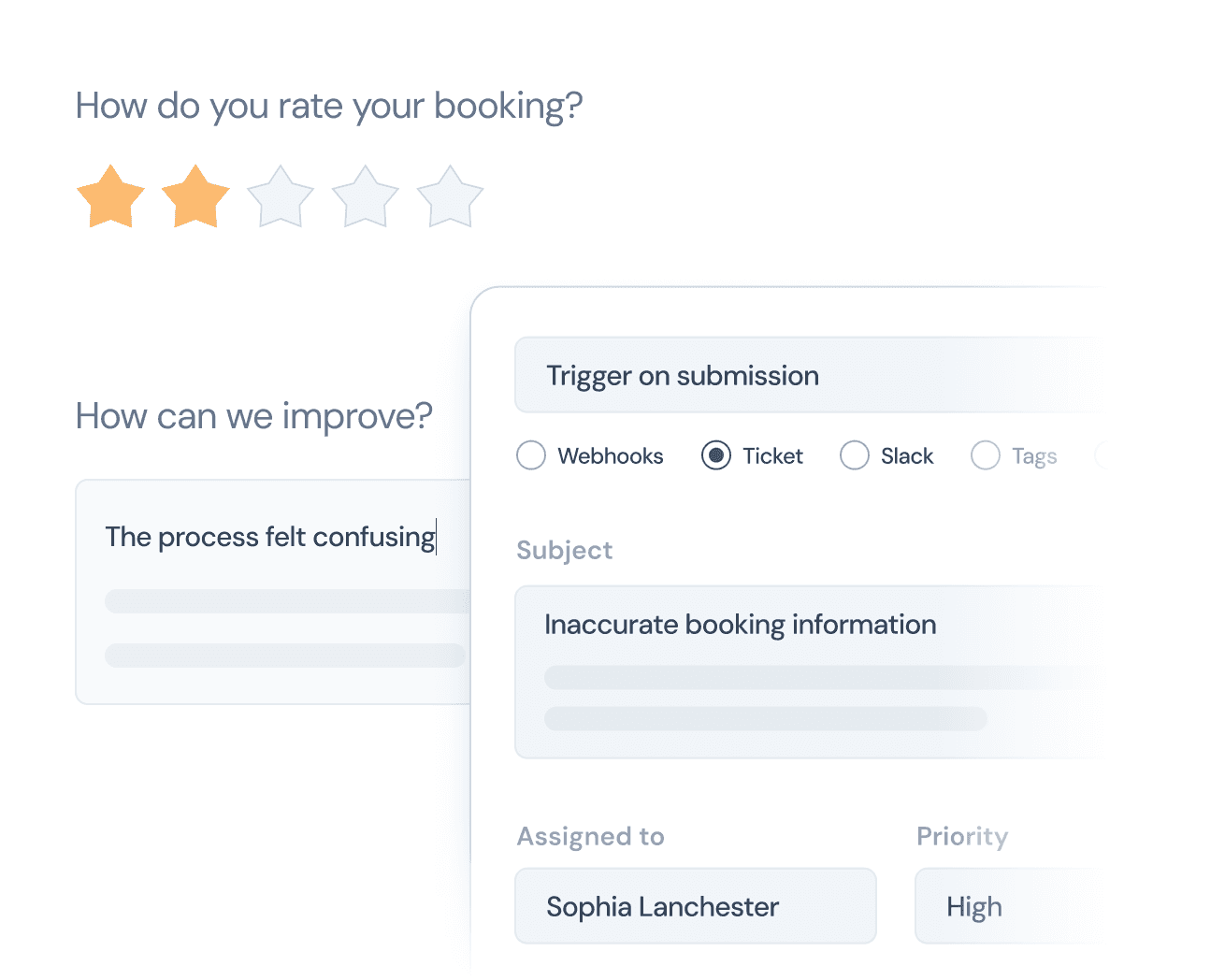
SurveySparrow can turn low scores into tickets, assign them to team members, and send alerts when a response needs attention, so follow-up doesn’t depend on someone checking a dashboard.
Fun ways to encourage survey participation
Good participation comes from making the survey worth people’s time. Some interactive elements can help, but they work best alongside the basics: a clear purpose, a short survey, and respect for the respondent. Avoid any method that pressures people to respond or nudges them toward particular answers.
Explain why the survey matters. Tell people what you’ll do with their answers. “Your feedback will decide which features we build next quarter” gives a concrete reason to respond.
Keep it short and easy. Remove every question that doesn’t serve your objective, and tell respondents how long the survey will take. An accurate time estimate builds trust.
Use progress indicators and interactive formats where they fit. A progress bar shows respondents how much is left. Conversational, one-question-at-a-time formats, such as SurveySparrow’s chat-style surveys, can make longer surveys feel lighter. Use images, emojis, or sliders when they make a question easier to answer, and skip them when they distract from it.
Offer an incentive when it suits the study. Research consistently shows that incentives raise response rates. Singer and Ye’s 2013 review of survey incentive research found that prepaid incentives tend to outperform promised ones, and that cash outperforms gifts. Results vary by setting, though. A Gallup experiment with a web survey of university alumni found that prepaid and post-paid incentives improved response rates by similar amounts. Keep incentives modest, so people respond because they want to share their views.
Personalize the invitation. Use the respondent’s name and refer to their specific experience, such as “your recent order” or “the workshop you attended.” Avoid personal details that might feel intrusive.
Send reminders at sensible intervals. One or two reminders, spaced a few days apart, catch people who meant to respond but forgot. Stop sending reminders once someone completes the survey.
Share what changed. Tell past respondents what you did with their feedback. People who see their input lead to a change are more willing to respond the next time.
Some Popular Question Types Used in Survey Design
The trick to a good survey is asking the right questions. We’ve put together some examples of survey questions that you can use.
1. The Multiple Choice
We’ve all, at some point in time, come across a multiple-choice question. And its beauty lies in the fact that it gives your respondents a finite number of answers. This way, they aren’t forced to think hard and can quickly move through the questions.

With this question, you can ask your customers to choose one answer and quickly move on.
Here, your respondents are free to choose one or more answers from the list.
For best results, we’d urge you to put these questions at regular intervals in the survey. This way, you can ensure that it’ll be quick and efficient.
2. Ranking Order Questions
As far as these examples go, this is a great one! Here, you’d be able to have an overview of all answers, allowing for easy comparison.
Let’s consider a company, A. It’s time for their annual customer review, and they want to quiz people on their services. So, this is how that could look:

And so, this survey design would let your respondents rank each answer as they please.
3. The Image Type Question
Now, this is a clear no-brainer. Here, to spruce your survey up, you can show your respondents a series of images and ask them to choose one as their answer.
Let’s say you’re a company that produces hot and cold beverages. So, your products must range from soft drinks and fruit juices to hot coffees and teas. In your survey design, you wish to find out what drinks would sell better during specific seasons. To do that, here’s how you can frame your question.
Then, you can show them images of all the beverages you sell and ask them to choose one or more.
Sounds fun, right? We think so!
4. Open-ended Questions
Finally, we’ve got the king of all survey questions, the open-ended ones. But fair warning! These questions come at a price.
Sure, they let you gather many long and thoughtful answers. However, they are also the most frustrating for your users. For one, they often need a lot of time to be answered. (You really don’t want them answering it all willy-nilly!)
And second, not everyone would have something in-depth to say. So, while you must give them such a question, make sure they’re also optional!
Now, here are some open-ended question examples:
- What are your thoughts on our product XYZ?
- How would you like us to improve?
- Do you have any suggestions for us? And so on.

How to Ask Someone to Take a Survey?
A good survey invitation tells people what the survey is about, why their input matters, and how long it will take. Include these five elements:
- Purpose: What the survey is about and how you’ll use the results
- Audience: Why this person was chosen
- Time: An honest estimate of how long it takes
- Deadline: When the survey closes, if it does
- Link: One clear link to the survey
State whether participation is voluntary and whether responses are anonymous or confidential.
Here’s a template you can adapt:
Hi [Name], we’re conducting a short survey to understand [topic]. Your feedback will help us [purpose]. It should take around [X minutes] to complete. If you’re available, please share your thoughts here: [survey link]. Thank you for your time.
Adjust the tone for each audience:
- Customers: Keep it brief and refer to their specific experience, such as a recent purchase or support request.
- Employees: Explain how responses will be kept confidential and who will see the results. Employees are more candid when they trust the process.
- Research participants: Include the study’s purpose, who is running it, how data will be stored, and how to contact the research team. Academic studies may also need wording approved by an ethics board.
How to choose a survey tool?
The right survey tool depends on the type of surveys you run and how you plan to use the data. Compare tools on these features:
- Question types and survey logic: Check that the tool supports the formats you need and lets you set skip logic and randomization.
- Distribution channels: Make sure it can reach your respondents by email, SMS, web, app, or in person.
- Mobile-friendly surveys: Preview surveys on a phone before you commit.
- Response analysis and reporting: Look for dashboards, filters, and text analysis for open-ended answers.
- Integrations: Confirm it connects with the tools your team already uses, such as your CRM or help desk.
- Privacy, security, and access controls: Review how the tool stores data, which compliance standards it supports, and who on your team can see responses.
Best tools for customer feedback collection
Customer feedback tools focus on CSAT, NPS, and CES surveys, multichannel distribution, and closed-loop follow-up. Compare the leading options in our guide to the best customer feedback tools.
Best tools for employee feedback collection
Employee feedback tools focus on engagement surveys, pulse checks, confidentiality controls, and manager-level reporting. Compare the top tools here.
Create Surveys that Encourage Participation
Effective survey design starts with a clear objective. That objective shapes who you ask, which questions you include, how you word them, and how you analyze the answers. Pretest every survey before launch, because small wording and order problems can change your results.
When you’re ready to build your survey, SurveySparrow gives you templates, skip logic, multichannel distribution, and reporting in one place.


Create your first survey for free
TRUSTED BY BEST-IN-CLASS BRANDS