

Measuring Support Quality at Scale
Tech support is usually measured in tickets closed, not customers kept.
But if you run a modern tech support team, you already know:
- “Tickets resolved” doesn’t tell you how they were handled.
- SLA compliance doesn’t show you whether customers would come back.
- A single quarterly satisfaction survey is too slow and too fuzzy.
That’s where CSAT done properly becomes a competitive advantage, not just a vanity metric.
In this guide, we’ll treat CSAT as a system you design—not a score you report.
What Makes Measuring Support Quality So Difficult Today
Most teams don’t struggle with collecting feedback—they struggle with separating signal from noise. When support is distributed across internal specialists, self-service flows, and outsourced technical support teams, you don’t get one unified experience. You get a patchwork of micro-interactions shaped by different playbooks, tooling, response styles, and technical depth. CSAT exposes those seams quickly: one queue consistently gets low scores after escalations, or one partner’s overnight coverage resolves issues but leaves customers feeling unheard. These patterns don’t show up in ticket metrics, but they become painfully obvious when you read the actual comments.
This is where most CSAT programs fall apart—not because the survey is wrong, but because teams aren’t using it to pinpoint where support quality breaks down and why.
What “Support Quality” Really Looks Like in Tech Support
Before you measure, you need a concrete definition. In tech support, “quality” usually comes down to five things:
- Accuracy – Was the solution technically correct and complete?
- Resolution – Did the issue stay fixed, or did the customer come back?
- Effort – How hard did the customer have to work to get help?
- Speed – Was the problem resolved in a time that felt reasonable to the customer?
- Empathy – Did the agent show they understood the impact on the customer?
Most teams only track the “speed” part (FRT, TTR) and assume everything else is fine. CSAT is your way to capture the other four at scale—across channels, agents, and time.
Why Many CSAT Programs Fail (Even When the Score Looks Good)
If your CSAT program isn’t designed intentionally, you end up with a nice-looking number and…not much else.
Here are the biggest failure modes in tech support:
- Surveying only the easy cases For example, sending a survey only when a ticket is closed as “Solved” by the agent. You miss all the escalations, reopens, and frustrated walkaways. Your CSAT looks amazing—and is completely misleading.
- Treating CSAT as a report, not a feedback loop If nothing in your operations changes based on CSAT trends, it’s decoration, not data.
- Conflating agent performance with broken processes Customers often rate the experience, not the person. Poor tooling, buggy product releases, or unclear policies can tank CSAT, even if your agents are brilliant.
- Measuring too late A survey sent days after resolution often collects generic answers or gets ignored. The closer you are to the moment of support, the better the signal.
If you want CSAT to actually drive better tech support, you need a systematic approach.
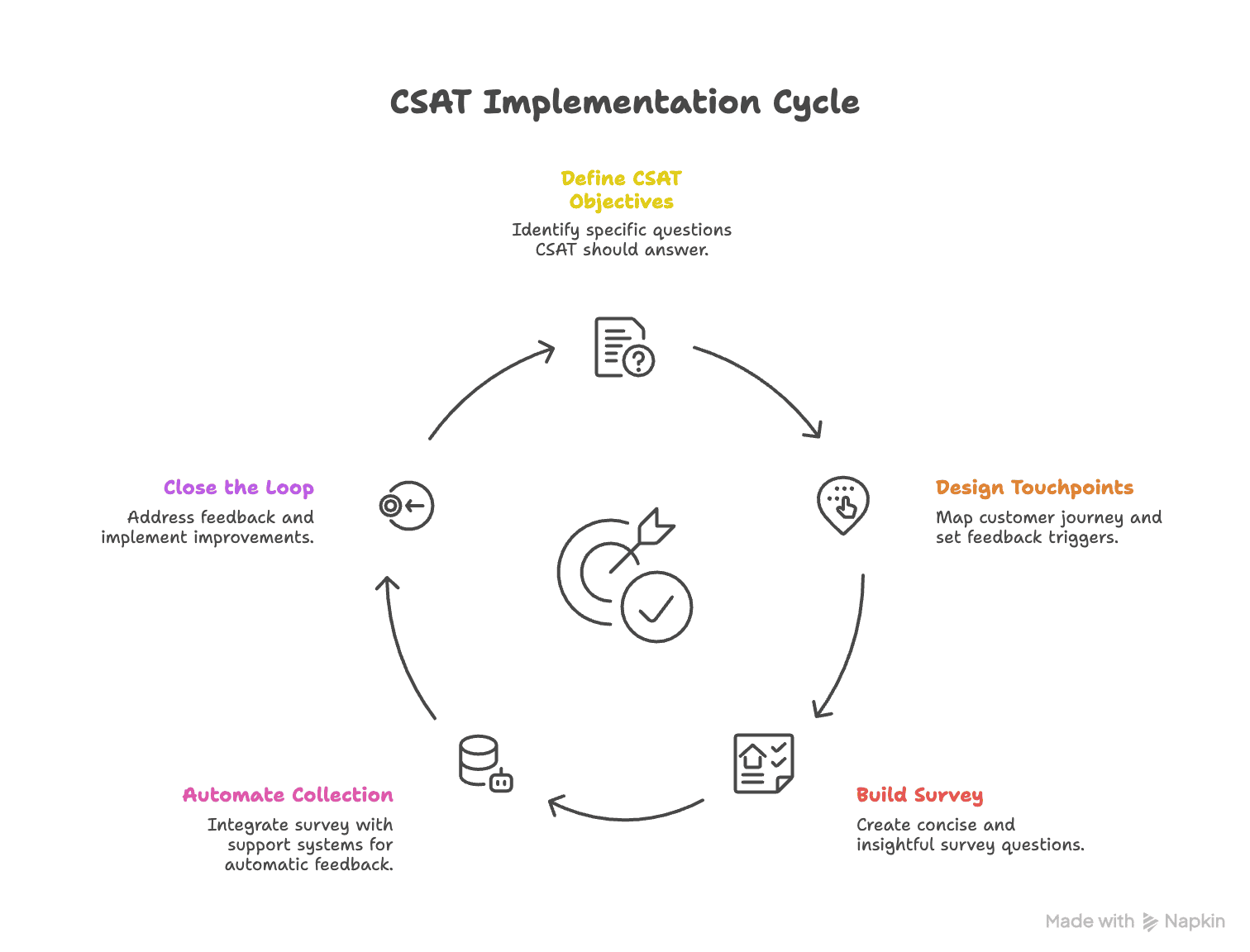
A 5-Step CSAT Framework for Tech Support Teams
Think of this as a playbook you can roll out in phases. You don’t need a big-bang project; you can pilot this with one queue or channel first.
Step 1: Define What You Want CSAT to Inform
CSAT should answer specific operational questions, like:
- “Which types of issues create the most dissatisfaction?”
- “Which channels generate the most frustrated customers?”
- “Which product areas are driving repeated support contacts?”
- “What process or policy changes would most improve satisfaction?”
Document the decisions you want CSAT to inform. That determines how you design questions and workflows.
Step 2: Design CSAT Touchpoints in the Tech Support Journey
Map your tech support journey and decide where to ask for feedback. Common triggers:
- Ticket marked as Resolved / Closed
- Chat session ended (human or bot)
- Callback completed from a phone queue
- Bug workaround provided and shared
- Escalation resolved (L2/L3 dev/engineering support)
Good rules of thumb:
- Ask once per resolution, not once per message.
- Keep it one-click simple on the first question (e.g., 1–5 or emoji scale).
- Trigger the survey within minutes, not days.
Step 3: Build the CSAT Survey (Lean but Insightful)
For tech support, you don’t need 15 questions. You need 2–4 smart ones.
Core structure:
- Primary CSAT question (required) “How satisfied are you with the support you received today?”
- Scale: 1–5 or 1–7 (label each point clearly).
- Root-cause driver question (optional, 1–2 choices) “What most influenced your rating today?”
- Options like:
- Speed of resolution
- Technical accuracy of the solution
- Ease of getting help
- The way the support agent communicated
- Issue not fully resolved
- Had to contact support multiple times
- Options like:
- Effort or resolution check (optional) “How easy was it to get your issue resolved?”
- 1–7 “Very difficult” → “Very easy”.
- Short open text (only when necessary) “What’s one thing we could have done better?”
That’s it. Enough to understand what happened and why, without creating survey fatigue.
Step 4: Automate Collection & Routing
Once you have your survey, you want it to run automatically in the background.
In a platform like SurveySparrow, the flow usually looks like this:
- Integrate your helpdesk / support stack (e.g., Zendesk, Freshdesk, Intercom, custom tools)
- Set a trigger: when ticket status changes to Resolved or Closed
- Fire a CSAT survey via:
- In-app widget
- SMS
- Chat follow-up
- Pipe responses into a dashboard with filters:
- Channel
- Product area
- Issue type
- Agent / team
- Region / customer segment
Then add routing rules:
- If CSAT ≤ 2 → create a follow-up ticket tagged “CSAT_Detractor”
- If comment field contains certain keywords (“cancel”, “churn”, “lawsuit”, etc.) → alert a manager
- If CSAT is consistently low for a category (“Billing”, “Onboarding”, “Mobile app”) → notify owner / product manager
Now CSAT isn’t just a number. It’s a system that routes risk and opportunity to the right people.
Step 5: Close the Loop and Improve
“Thanks for your feedback” is not closing the loop.
For tech support teams, closing the loop means:
- At the customer level
- Reach out to low-scoring customers with a short, human message.
- Clarify / fix the issue.
- Confirm with the customer that it’s resolved.
- At the agent level
- Review patterns in an agent’s CSAT over time, not just one bad score.
- Use real comments in coaching sessions.
- Celebrate agents who turn difficult cases into high CSAT.
- At the process / product level
- Tag CSAT feedback by product area and issue type.
- Identify “top 3 CSAT killers” each quarter.
- Build a simple loop:
- Identify pattern
- Quantify impact (CSAT, volume, churn risk)
- Propose fix (macro, article, product change, policy change)
- Implement
- Track CSAT for that category post-change
If your CSAT doesn’t trigger any changes in process, training, or product, you’re not closing the loop.
Metrics to Pair with CSAT (So You Don’t Misread It)
CSAT alone can mislead you. To truly measure tech support quality, combine it with operational metrics.
Track CSAT alongside:
- First Response Time (FRT) – How fast customers hear back from you.
- Time to Resolution (TTR) – How long it takes to fully resolve the issue.
- First Contact Resolution (FCR) – % of cases solved in a single interaction.
- Reopen Rate – Tickets reopened after being marked as solved.
- Escalation Rate – % of tickets pushed to higher tiers.
- Contact Rate – How often customers need to contact support for the same product flow.
Examples of insights:
- High CSAT + high TTR → Customers tolerate slower responses when the solution is strong and communication is good. → Opportunity: improve speed without sacrificing quality.
- Low CSAT + low TTR → You’re fast, but not helpful. Possibly over-focused on handle time over actual resolution.
- Low CSAT + high reopen rate → You’re closing tickets too early. Define better criteria for “Resolved” and coach on root cause analysis.
This is where a feedback platform with combined dashboards (survey data + operational data) is incredibly useful. You don’t want CSAT in one system and support metrics elsewhere, never meeting.
How a Platform Like SurveySparrow Fits into This Picture
If you’re pitching or writing for SurveySparrow’s audience, here’s how to naturally tie the playbook into their world without sounding like a sales page.
A feedback platform like SurveySparrow can help tech support teams:
- Automate CSAT triggers
- Connect your helpdesk
- Fire CSAT surveys on specific ticket events
- Use different templates per channel (chat vs email vs phone)
- Run conversational CSAT
- Use chat-style, mobile-friendly surveys that feel like a continuation of the support interaction.
- This typically leads to higher response rates than traditional, rigid forms.
- Segment and drill down
- Filter CSAT by agent, queue, product, region, device type, or issue category.
- Quickly see patterns like “Mobile app performance issues” dragging down scores across markets.
- Automate workflows on top of bad scores
- Create follow-up tasks or tickets for detractors.
- Notify supervisors of severe feedback.
- Push tags and scores back into your CRM or ticketing system.
- Share insights across teams
- Automatically email weekly CSAT digests to product, engineering, and operations leaders.
- Export data into BI tools if needed.
The key narrative: CSAT isn’t just a survey; it becomes a backbone of your support improvement cycles. A tool like SurveySparrow just makes that scalable and consistent.
Turning CSAT into a Strategic Asset for Tech Support
When you implement CSAT as a system—not an afterthought—you unlock three big wins:
- For leaders – You see which parts of your support operation truly drive satisfaction or frustration, backed by numbers and customer quotes.
- For agents – They get concrete, real-world feedback that helps them improve and feel recognized.
- For customers – They feel that reaching tech support isn’t a last resort; it’s a reliable, respectful part of their experience with your product.
Tech support will never be completely free of frustrations—that’s the nature of complex products. But with a data-driven CSAT program, you can decide which frustrations you’re willing to live with and which you’ll systematically design out of the experience.